Friday, October 15, 2021

javax.persistence.PersistenceException : (should be mapped with insert="false" update="false")

 Caused by: javax.persistence.PersistenceException: [PersistenceUnit: default] Unable to build Hibernate SessionFactory; nested exception is org.hibernate.MappingException: Repeated column in mapping for entity: com.model.ImprovementInitiative column: investmentQualitative (should be mapped with insert="false" update="false")

Solution

column is repeated.

name of the column is "investmentQualitative "

search that column name in your Model or POJO class "ImprovementInitiative "

remove the repeated or duplicate values

In simple you are trying to create two columns with same name 


Running Spring boot App command line with Maven


mvn spring-boot:run
for gradle
./gradlew bootRun

Wednesday, September 15, 2021

BCryptHash could not be located - MongoDB

 When you try to start mongodb using "mongod.exe" you might get this error relating to 'BCryptHash"

This error comes cause of mongodb version does not support to your windows or OS of the machine. If you are using windows server, check whether it is compatible with your server version

you  can find the compatibility with below link

https://docs.mongodb.com/manual/tutorial/install-mongodb-on-windows/#platform-support


Import certificate to java Key store

 you can use keytool  to install a certificate to keystore. This is needed as eg: when you access a details from Jira site you need to install certificate of jira site to your local java key store.

Let's  say you need to extract details from your Jira production server.

1. save the certificate of the site via browser. you can click the lock sign left with the address bar.


 after that Click Certificate

Go to "Details" tab 

and Click "Copy to File"

let's assume you save the certificate as "jiraProd.cer". Note: cer extension will  automatically given when saving.

2. install certificate use below command

keytool -import -alias jiraProd -keystore "C:\SW\openlogic-openjdk-11\lib\security\cacerts" -file C:\SW\Certs\jiraProd.cer

keytool - tool use to import certicate

alias name given as "jiraProd " . you can verify your certificate after installation by this name

-alias jiraProd   

path to the keysore file

-keystore "C:\SW\openlogic-openjdk-11\lib\security\cacerts"     

 your certificate file or path to certificate file

-file C:\SW\Certs\jiraProd.cer

Install MongoDB in ubuntu

 when you take a specific version of MongoDB, it does not support all the operating systems as a whole.

1. So we need to check the compatibility before.

2. Once find out the correct version suitable for your OS, you can start installing


Below are short steps to install mongo in Ubuntu 18.04 Bionic version.

1. Import the public key used by the package management system.

wget -qO - https://www.mongodb.org/static/pgp/server-5.0.asc | sudo apt-key add -


2. Create a list file for MongoDB

echo "deb [ arch=amd64,arm64 ] https://repo.mongodb.org/apt/ubuntu bionic/mongodb-org/5.0 multiverse" | sudo tee /etc/apt/sources.list.d/mongodb-org-5.0.list

3. Reload local package database

sudo apt-get update

4.Install the MongoDB packages

sudo apt-get install -y mongodb-org

5. Start MongoDB service

 before start service, check whether linux use "systemd" or "init" --> run below

ps --no-headers -o comm 1

to run mongodb

sudo systemctl start mongod

6. Add mondb service to start at restart

sudo systemctl enable mongod


For more info, you can follow

https://docs.mongodb.com/manual/tutorial/install-mongodb-on-ubuntu/

Monday, July 19, 2021

Hibernate - 1

1. Overview of ORM and Hibernate

2. Mappings

  1. Simple
  2. Component
  3. Inheritance 
  4. Collections
  5. Association  

3. Object states in hibernate

4. HQL

5. Criteria


JDBC - Challenges

1. Creating and Closing the connection

2. Dependency - drivers and connection related code depends on the database - whenever DB changes, code needs to be change. For any change, table rename, column added, data type.. for any small change needs application change.

3. Exception handling

4. SQL challenges - for programmer ( programmers tend to low in SQL )

5. Data conversion 


ORM - Object Relational Mapping - In simple Map Object(fields) with Table (columns)

XML based

Annotations 

Hibernate - JPA specification - lies between Java Application and JDBC
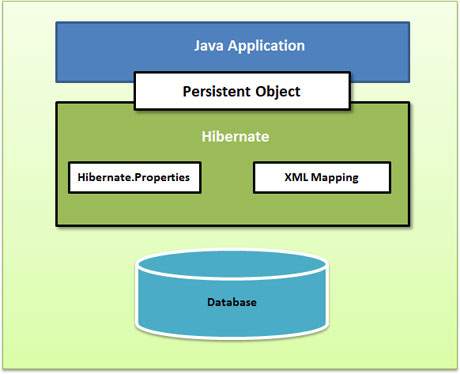
Hibernate High Level View


Creating Application

Step 1 : Dependency 

    a. hibernate

     b. JDBC

Step 2: Entity or Persistent - java bean

Step 3: Mapping - contain bean and table ( no configuration on database )

     a.  XML 

      b. Annotations

Step 4: Database (hibernate config)

a. XML

b. properties

c. Programmatic

Step 5: Client - main application 


Step 1 : use spring initializer with adding Spring data JPA,  mysql (driver depends on DB)

Step 2: Create simple Java class and decorate with annotations. @Entity and @ID are important . If you do not use @Table, @Column automatically taken name of class as table name as fields as columns


Step 5: Where should the program start ? reading the configuration for DB. From configurations create Session factory (immutable singleton).Session factory is like a pool of connections.


In Code, lets' assume you have written code to read configuration and created SessionFactory. now execute code. Will tables get created. log will show dropping and creating tables.

No tables will be created. Why ? we have not made a session and create a object and set POJO to session and execute. Then hibernate will create a table, if not ( we are running on UPDATE, not CREATE)

Still new object will not be saved. Why ? 

By default - hibernate auto commit is disable.

Create a Transaction and commit after save(). you can see the INSERT statement. 


Friday, July 2, 2021

Docker Notes -1

 docker-compose down --rmi -all


how do we run two OS in one machine - Using Hypervisor


OS1  | OS2

----------

Hypervisor

-----------

Machine OS


Hypervisor : Virtual Box, VMVare, Hyper-v(only Windows)


Benifit creating Virtual machine

Run application in isolation

same application using different version

eg:

virtual Machine1{App1 with Node14, Mongo 4}

virtual Machine2{App2 with Node9, Mongo 3}


Problems with VMs

-----

Each machine needs full-blown OS (license)

Slow to start ( cause entire OS needs to start just as a normal machine)

Resource intensive ( takes certain Hardware - RAM, cpu ..)


Containers

-----

Allow running multiple apps in isolation(same kind of a isolation)

light weight

Use OS of the host ( share)

Start quickly ( OS already started)

need less hardware resources


so can run more containers compared to vms


docker run client - server architecture

client communicate using RESTApi

server --> docker engine


technically container is a process


basically all containers use kernal of the host
kernal - manages all applications and hardware