Showing posts with label hibernate. Show all posts

Wednesday, June 14, 2023

MS - Springboot + Hibernate + Rest web service chapter 1

 Create a simple REST web service using springboot.

Use spring initializer   https://start.spring.io/

Dependencies

Web, JPA, database ( Mysql Connctor ) 

for your wish you can use, lombok, actuator, devtools

Webservice will include simple CRUD operation alias with REST POST,GET, PUT, GET

Tech Stack

Java 8, Maven, Springboot 3.10 , 


Sample code as below

POM file

<?xml version="1.0" encoding="UTF-8"?>
<project xmlns="http://maven.apache.org/POM/4.0.0" xmlns:xsi="http://www.w3.org/2001/XMLSchema-instance"
xsi:schemaLocation="http://maven.apache.org/POM/4.0.0 https://maven.apache.org/xsd/maven-4.0.0.xsd">
<modelVersion>4.0.0</modelVersion>
<parent>
<groupId>org.springframework.boot</groupId>
<artifactId>spring-boot-starter-parent</artifactId>
<version>3.1.0</version>
<relativePath/> <!-- lookup parent from repository -->
</parent>
<groupId>com.demo.micro</groupId>
<artifactId>student</artifactId>
<version>0.0.1-SNAPSHOT</version>
<name>student</name>
<description>Student Service</description>
<properties>
<java.version>17</java.version>
</properties>
<dependencies>
<dependency>
<groupId>org.springframework.boot</groupId>
<artifactId>spring-boot-starter-actuator</artifactId>
</dependency>
<dependency>
<groupId>org.springframework.boot</groupId>
<artifactId>spring-boot-starter-data-jpa</artifactId>
</dependency>
<dependency>
<groupId>org.springframework.boot</groupId>
<artifactId>spring-boot-starter-web</artifactId>
</dependency>
<dependency>
<groupId>mysql</groupId>
<artifactId>mysql-connector-java</artifactId>
<version>8.0.31</version>
</dependency>
<dependency>
<groupId>org.projectlombok</groupId>
<artifactId>lombok</artifactId>
<optional>true</optional>
</dependency>

<dependency>
<groupId>org.springframework.boot</groupId>
<artifactId>spring-boot-devtools</artifactId>
<scope>runtime</scope>
<optional>true</optional>
</dependency>
<dependency>
<groupId>org.springframework.boot</groupId>
<artifactId>spring-boot-starter-test</artifactId>
<scope>test</scope>
</dependency>
</dependencies>

<build>
<plugins>
<plugin>
<groupId>org.springframework.boot</groupId>
<artifactId>spring-boot-maven-plugin</artifactId>
</plugin>
</plugins>
</build>

</project>


Application properties

server.port=8203
spring.datasource.url=jdbc:mysql://localhost:3306/student_mgt
spring.datasource.username=root
spring.datasource.password=root

# for Spring Boot 2
# spring.jpa.properties.hibernate.dialect= org.hibernate.dialect.MySQL5InnoDBDialect
# for Spring Boot 3
spring.jpa.properties.hibernate.dialect= org.hibernate.dialect.MySQLDialect
spring.jpa.show-sql=false
spring.jpa.generate-ddl=true
# Hibernate ddl auto (create, create-drop, validate, update)
spring.jpa.hibernate.ddl-auto=update
spring.jpa.hibernate.naming.physical-strategy=org.hibernate.boot.model.naming.PhysicalNamingStrategyStandardImpl


Code base Structure

com.demo.micro.student

controller --> will include REST API

model --> model classes

repository --> repo file, db connection

service --> service classes

MainApllication --> StudentApplication with @SpringBootApplication


Controller

package com.demo.micro.student.controller;

import com.demo.micro.student.model.Student;
import com.demo.micro.student.service.StudentServiceImpl;
import org.springframework.beans.factory.annotation.Autowired;
import org.springframework.http.HttpStatus;
import org.springframework.http.ResponseEntity;
import org.springframework.web.bind.annotation.*;

import java.util.List;
import java.util.Optional;

@RestController
@RequestMapping("/students")
public class StudentController {

@Autowired
StudentServiceImpl studentService;

@GetMapping("")
public ResponseEntity<List<Student>> list() {
return new ResponseEntity<List<Student>>(studentService.list(), HttpStatus.OK);
}

@PostMapping("")
public ResponseEntity<Student> resgiterStudent(@RequestBody Student student) {
try {
Student st = studentService.createStudent(student);
return new ResponseEntity<>(st, HttpStatus.CREATED);
} catch (Exception e) {
return new ResponseEntity<>(null, HttpStatus.INTERNAL_SERVER_ERROR);
}
}

@PutMapping("")
public ResponseEntity<Student> updateStudent(@RequestBody Student student) {
return new ResponseEntity<>(studentService.createStudent(student), HttpStatus.OK);
}

@PutMapping("/{id}")
public ResponseEntity<Student> updateStudent(@PathVariable("id") int id, @RequestBody Student student) {
Optional<Student> st = studentService.findById(id);
if (st.isPresent()) {
// set details for student
return new ResponseEntity<>(studentService.createStudent(student), HttpStatus.OK);
} else {
return new ResponseEntity<>(HttpStatus.NOT_FOUND);
}
}

/**
* Don't do this. We normally makes a soft delete -
* 1. update flag/property as deleted. But flag is redundant field
* 2. use date/time option. nullable date time or default old time.
*
* @param student
* @return
*/
@DeleteMapping("")
public ResponseEntity<Student> deleteStudent(@RequestBody Student student) {
studentService.deleteStudent(student);
return new ResponseEntity<>(null, HttpStatus.ACCEPTED);
}
}


Model

package com.demo.micro.student.model;

import jakarta.persistence.*;
import lombok.Data;

/**
* Student details.
*/
@Entity
@Table(name = "student")
@Data
public class Student {

@Id
@GeneratedValue(strategy = GenerationType.AUTO)
@Column(name = "student_id")
private int studentId;

/**
* First name of the student.
*/
@Column(name = "first_name")
private String firstName;

/**
* Last name of the student.
*/
@Column(name = "last_name")
private String lastName;


}

Repository

package com.demo.micro.student.repository;

import com.demo.micro.student.model.Student;
import org.springframework.data.jpa.repository.JpaRepository;

public interface StudentRepository extends JpaRepository<Student,Integer> {
}


Service classes - Interface and Impl

package com.demo.micro.student.service;

import com.demo.micro.student.model.Student;

import java.util.List;
import java.util.Optional;

/**
*
*/
public interface StudentService {

/**
* Returns a list of {@link Student}s.
* @return list of {@link Student}
*/
List<Student> list();
Student createStudent(Student student);

Optional<Student> findById(int studentId);

void deleteStudent(Student student);
}


package com.demo.micro.student.service;

import com.demo.micro.student.model.Student;
import com.demo.micro.student.repository.StudentRepository;
import org.springframework.beans.factory.annotation.Autowired;
import org.springframework.stereotype.Service;

import java.util.List;
import java.util.Optional;

@Service
public class StudentServiceImpl implements StudentService {

@Autowired
StudentRepository studentRepository;

/**
* List all the {@link Student}
*
* @return
*/
@Override
public List<Student> list() {
return studentRepository.findAll();
}

/**
* Create a new record of {@link Student}.
*
* @param student
* @return
*/
@Override
public Student createStudent(Student student) {
return studentRepository.save(student);
}

@Override
public Optional<Student> findById(int studentId) {
return studentRepository.findById(studentId);
}

public void deleteStudent(Student student) {
studentRepository.delete(student);
}

}


Important : Note that we put @Srvivie at Impl class, not Interface


Main class

package com.demo.micro.student;

import org.springframework.boot.SpringApplication;
import org.springframework.boot.autoconfigure.SpringBootApplication;

@SpringBootApplication
public class StudentApplication {

public static void main(String[] args) {
SpringApplication.run(StudentApplication.class, args);
}

}


Friday, January 21, 2022

Springboot Sample App - GET list of values from database

 1. get full list - all

http://localhost:8011/myapp/lov/all

This will have

  1. Controller
  2. Service and Impl
  3. Repository
  4. Model class

Controller

package com.sample.controller;


import com.sample.model.Lov;

import com.sample.service.LovServiceImpl;

import org.springframework.beans.factory.annotation.Autowired;

import org.springframework.http.HttpStatus;

import org.springframework.http.ResponseEntity;

import org.springframework.web.bind.annotation.GetMapping;

import org.springframework.web.bind.annotation.RequestMapping;

import org.springframework.web.bind.annotation.RequestParam;

import org.springframework.web.bind.annotation.RestController;


import java.util.List;


@RestController

@RequestMapping("/myapp/lov")

public class LovController {


    @Autowired

    LovServiceImpl lovService;


    @GetMapping("/all")

    public ResponseEntity<List<Lov>> retrieveAllValues() {

        return new ResponseEntity<List<Lov>>(lovService.retrieveAllValues(), HttpStatus.OK);

    }


    @GetMapping("/fieldName")

    public ResponseEntity<List<Lov>> findByFieldName(@RequestParam String fieldName) {

        return new ResponseEntity<List<Lov>>(lovService.findByFieldName(fieldName), HttpStatus.OK);

    }


    @GetMapping("/fieldName1")

    public ResponseEntity<List<Lov>> findLovByFieldName(@RequestParam String fieldName) {

        return new ResponseEntity<List<Lov>>(lovService.findLovByFieldName(fieldName), HttpStatus.OK);

    }


    @GetMapping("/fieldId")

    public ResponseEntity<List<Lov>> findByFieldId(@RequestParam String fieldId) {

        return new ResponseEntity<List<Lov>>(lovService.findByFieldId(fieldId), HttpStatus.OK);

    }

}


-----------------

Model class

package com.sample.model;

import lombok.Data;

import javax.persistence.*;

@Entity
@Table(name = "lov")
@Data
public class Lov {

    @Id
    private int lovId;

    @Column(name = "fieldName")
    private String fieldName;

    @Column(name = "fieldId")
    private String fieldId;

    @Column(name = "value")
    private String value;
}


--------------------------------------------------------------------------------------

Service interface

package com.sample.service;

import com.sample.model.Lov;
import com.sample.repository.LovRepository;
import org.slf4j.Logger;
import org.slf4j.LoggerFactory;
import org.springframework.beans.factory.annotation.Autowired;
import org.springframework.stereotype.Repository;

import java.util.List;


public interface LovService {

    List<Lov> retrieveAllValues();

    List<Lov> findByFieldName(String fieldName);

    List<Lov> findLovByFieldName(String fieldName);

    List<Lov> findByFieldId(String fieldId);
}


--------------------------------

Service Impl


package com.sample.service;

import com.sample.model.Lov;
import com.sample.repository.LovRepository;
import org.slf4j.Logger;
import org.slf4j.LoggerFactory;
import org.springframework.beans.factory.annotation.Autowired;
import org.springframework.stereotype.Repository;
import org.springframework.stereotype.Service;

import java.util.List;

@Service
public class LovServiceImpl implements LovService {
    private static final Logger logger = LoggerFactory.getLogger(LovServiceImpl.class);

    @Autowired
    LovRepository lovRepository;

    public List<Lov> retrieveAllValues() {
        return lovRepository.findAll();
    }

    public List<Lov> findByFieldName(String fieldName) {
        return lovRepository.findByFieldName(fieldName);
    }

    public List<Lov> findLovByFieldName(String fieldName) {
        return lovRepository.findLovByFieldName(fieldName);
    }

    public List<Lov> findByFieldId(String fieldId) {
        return lovRepository.findByFieldId(fieldId);
    }
}

-----------------------------------------

Repository

package com.sample.repository;

import com.sample.model.Lov;
import org.springframework.data.jpa.repository.JpaRepository;

import java.util.List;

public interface LovRepository extends JpaRepository<Lov,Integer> {

    List<Lov> findLovByFieldName(String fieldName);

    List<Lov> findByFieldName(String fieldName);

    List<Lov> findByFieldId(String fieldId);
}


Properties


server.port=8011
#your database name is mydb
spring.datasource.url=jdbc:mysql://localhost:3306/mydb
spring.datasource.username=username
spring.datasource.password=password

spring.jpa.database-platform=org.hibernate.dialect.MySQL5InnoDBDialect
spring.jpa.show-sql=false
spring.jpa.generate-ddl=true
spring.jpa.hibernate.ddl-auto=update
spring.jpa.hibernate.naming.physical-strategy=org.hibernate.boot.model.naming.PhysicalNamingStrategyStandardImpl

logging.level.root=warn
logging.level.com.sample=debug 

Dependency


<dependency>
<groupId>org.springframework.boot</groupId>
<artifactId>spring-boot-starter-data-jpa</artifactId>
</dependency>
<dependency>
<groupId>org.springframework.boot</groupId>
<artifactId>spring-boot-starter-web</artifactId>
</dependency>
<dependency>
<groupId>mysql</groupId>
<artifactId>mysql-connector-java</artifactId>
<scope>runtime</scope>
</dependency>
<dependency>
<groupId>org.projectlombok</groupId>
<artifactId>lombok</artifactId>
<optional>true</optional>
</dependency>
<dependency>
<groupId>commons-io</groupId>
<artifactId>commons-io</artifactId>
<version>2.6</version>
</dependency>


Friday, October 15, 2021

javax.persistence.PersistenceException : (should be mapped with insert="false" update="false")

 Caused by: javax.persistence.PersistenceException: [PersistenceUnit: default] Unable to build Hibernate SessionFactory; nested exception is org.hibernate.MappingException: Repeated column in mapping for entity: com.model.ImprovementInitiative column: investmentQualitative (should be mapped with insert="false" update="false")

Solution

column is repeated.

name of the column is "investmentQualitative "

search that column name in your Model or POJO class "ImprovementInitiative "

remove the repeated or duplicate values

In simple you are trying to create two columns with same name 


Monday, July 19, 2021

Hibernate - 1

1. Overview of ORM and Hibernate

2. Mappings

  1. Simple
  2. Component
  3. Inheritance 
  4. Collections
  5. Association  

3. Object states in hibernate

4. HQL

5. Criteria


JDBC - Challenges

1. Creating and Closing the connection

2. Dependency - drivers and connection related code depends on the database - whenever DB changes, code needs to be change. For any change, table rename, column added, data type.. for any small change needs application change.

3. Exception handling

4. SQL challenges - for programmer ( programmers tend to low in SQL )

5. Data conversion 


ORM - Object Relational Mapping - In simple Map Object(fields) with Table (columns)

XML based

Annotations 

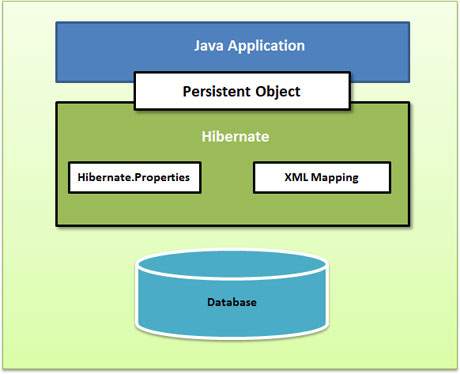
Hibernate - JPA specification - lies between Java Application and JDBC

Hibernate High Level View


Creating Application

Step 1 : Dependency 

    a. hibernate

     b. JDBC

Step 2: Entity or Persistent - java bean

Step 3: Mapping - contain bean and table ( no configuration on database )

     a.  XML 

      b. Annotations

Step 4: Database (hibernate config)

a. XML

b. properties

c. Programmatic

Step 5: Client - main application 


Step 1 : use spring initializer with adding Spring data JPA,  mysql (driver depends on DB)

Step 2: Create simple Java class and decorate with annotations. @Entity and @ID are important . If you do not use @Table, @Column automatically taken name of class as table name as fields as columns


Step 5: Where should the program start ? reading the configuration for DB. From configurations create Session factory (immutable singleton).Session factory is like a pool of connections.


In Code, lets' assume you have written code to read configuration and created SessionFactory. now execute code. Will tables get created. log will show dropping and creating tables.

No tables will be created. Why ? we have not made a session and create a object and set POJO to session and execute. Then hibernate will create a table, if not ( we are running on UPDATE, not CREATE)

Still new object will not be saved. Why ? 

By default - hibernate auto commit is disable.

Create a Transaction and commit after save(). you can see the INSERT statement. 


Wednesday, November 14, 2018

Hibernate changing column names of the table

I have created a simple table with two fields and called simple CRUD operation to view the data.

Technolgy: Springboot, hibernate(JPA), MySQL

table name = cluster

CREATE DATABASE IF NOT EXISTS `myDb`;
USE `myDb`;

DROP TABLE cluster;

CREATE TABLE IF NOT EXISTS `cluster` (
  `clusterId` bigint(5) NOT NULL AUTO_INCREMENT,
  `name` varchar(200) NOT NULL,
  PRIMARY KEY (`clusterId`)
) ENGINE=InnoDB;


INSERT INTO `cluster` (`clusterId`, `name`) VALUES
(1, 'C1'),
(2, 'C2'),
(3, 'C3');

but when i call rest http://localhost:8888/entity/clusters

this creating another field in the table with name "cluster_id"

Reason:
hibernate , Springboot provides the default naming strategy as the "ImprovedNamingStrategy"
https://docs.jboss.org/hibernate/orm/4.3/javadocs/org/hibernate/cfg/ImprovedNamingStrategy.html

This creating names according to the built in strategy
eg: clusterId --> cluster_id
     Cluster  --> cluster

Solution:
change naming strategy

spring.jpa.hibernate.naming.physical-strategy=org.hibernate.boot.model.naming.PhysicalNamingStrategyStandardImpl


For Information below is the complete code

--------------
import java.util.List;

import org.springframework.beans.factory.annotation.Autowired;
import org.springframework.http.HttpHeaders;
import org.springframework.http.HttpStatus;
import org.springframework.http.ResponseEntity;
import org.springframework.web.bind.annotation.DeleteMapping;
import org.springframework.web.bind.annotation.GetMapping;
import org.springframework.web.bind.annotation.PathVariable;
import org.springframework.web.bind.annotation.PostMapping;
import org.springframework.web.bind.annotation.PutMapping;
import org.springframework.web.bind.annotation.RequestBody;
import org.springframework.web.bind.annotation.RequestMapping;
import org.springframework.web.bind.annotation.RestController;
import org.springframework.web.util.UriComponentsBuilder;


@RestController
@RequestMapping("entity")
public class ClusterController {

@Autowired
private ClusterServiceImpl clusterService;

@GetMapping("clusters")
public ResponseEntity> getClusterList() {
List clusList = clusterService.getClusterList();

return new ResponseEntity>(clusList, HttpStatus.OK);
}

@GetMapping("cluster/{id}")
public ResponseEntity getClusterById(@PathVariable("id") Integer id) {
Cluster cluster = clusterService.getClusterById(id);
return new ResponseEntity(cluster, HttpStatus.OK);
}

@PostMapping("cluster")
public ResponseEntity createCluster(@RequestBody Cluster cluster, UriComponentsBuilder builder) {
boolean flag = clusterService.addCluster(cluster);
if (!flag) {
return new ResponseEntity(HttpStatus.CONFLICT);
}
HttpHeaders headers = new HttpHeaders();
headers.setLocation(builder.path("/cluster/{id}").buildAndExpand(cluster.getId()).toUri());

return new ResponseEntity(headers, HttpStatus.CREATED);
}

@PutMapping("cluster")
public ResponseEntity updateCluster(@RequestBody Cluster cluster) {
clusterService.updateCluster(cluster);
return new ResponseEntity(cluster, HttpStatus.OK);
}

@DeleteMapping("cluster/{id}")
public ResponseEntity deleteCluster(@PathVariable("id") Integer id) {
clusterService.deleteCluster(id);
return new ResponseEntity(HttpStatus.NO_CONTENT);
}

}


----------------

import javax.persistence.Column;
import javax.persistence.Entity;
import javax.persistence.GeneratedValue;
import javax.persistence.GenerationType;
import javax.persistence.Id;
import javax.persistence.Table;

@Entity
@Table(name = "cluster")
public class Cluster {
@Id
@GeneratedValue(strategy = GenerationType.AUTO)
@Column(name = "clusterId")
private long id;

@Column(name = "name")
private String name;

public long getId() {
return id;
}

public void setId(long id) {
this.id = id;
}

public String getName() {
return name;
}

public void setName(String name) {
this.name = name;
}


}

------------------------
import java.util.ArrayList;
import java.util.List;

import org.springframework.beans.factory.annotation.Autowired;

import org.springframework.stereotype.Service;

@Service
public class ClusterServiceImpl implements ClusterService {
@Autowired
private ClusterRepository clusterRepository;

@Override
public List getClusterList() {
List clusterList = new ArrayList<>();
clusterRepository.findAll().forEach(elment -> clusterList.add(elment));

return clusterList;
}

@Override
public Cluster getClusterById(long id) {
Cluster cluster = clusterRepository.findById(id).get();
return cluster;
}

@Override
public boolean addCluster(Cluster cluster) {
Cluster clus = clusterRepository.save(cluster);
return false;
}

@Override
public void updateCluster(Cluster cluster) {
clusterRepository.save(cluster);
}

@Override
public void deleteCluster(long clusterId) {
// Cluster cluster = new Cluster();
// cluster.setId(clusterId);
clusterRepository.delete(getClusterById(clusterId));

}

}

---------


import java.util.List;

import org.springframework.stereotype.Service;


@Service
public interface ClusterService {

List getClusterList();

Cluster getClusterById(long id);

boolean addCluster(Cluster cluster);

void updateCluster(Cluster cluster);

void deleteCluster(long clusterId);
}


--------------------

import org.springframework.data.repository.CrudRepository;


public interface ClusterRepository extends CrudRepository {

}


-----------------

application.properties


spring.jpa.hibernate.ddl-auto=update
#spring.jpa.hibernate.naming.implicit-strategy=org.hibernate.cfg.DefaultComponentSafeNamingStrategy
spring.jpa.hibernate.naming.physical-strategy=org.hibernate.boot.model.naming.PhysicalNamingStrategyStandardImpl

spring.datasource.url=jdbc:mysql://localhost:3306/myDB
spring.datasource.username=root
spring.datasource.password=123

spring.datasource.hikari.connection-timeout=20000
spring.datasource.hikari.minimum-idle=5
spring.datasource.hikari.maximum-pool-size=12
spring.datasource.hikari.idle-timeout=300000
spring.datasource.hikari.max-lifetime=1200000

spring.jpa.properties.hibernate.dialect = org.hibernate.dialect.MySQLDialect
spring.jpa.properties.hibernate.id.new_generator_mappings = false
spring.jpa.properties.hibernate.format_sql = true

logging.level.org.hibernate.SQL=DEBUG
logging.level.org.hibernate.type.descriptor.sql.BasicBinder=TRACE 

server.port=8888

eureka.client.serviceUrl.defaultZone= http://localhost:1111/eureka/
eureka.instance.leaseRenewalIntervalInSeconds=5 


Tuesday, October 3, 2017

Cannot insert explicit value for identity column in table 'TableName' when IDENTITY_INSERT is set to OFF

You must have experience above error

Cannot insert explicit value for identity column in table 'TableName' when IDENTITY_INSERT is set to OFF

Reason: I have used annotation for hibernate. In my class i have not specified the "GenerationType" for the


@Id
@GeneratedValue(strategy = GenerationType.AUTO)
@Column(name = "ID", unique = true, nullable = false)
public int getId() {
return id;
}


-----------------error-----------


SEVERE: Could not synchronize database state with session
org.hibernate.exception.SQLGrammarException: could not insert: [com.sqlserver.test.RestoreUSFinanceCube]
at org.hibernate.exception.SQLStateConverter.convert(SQLStateConverter.java:67)
at org.hibernate.exception.JDBCExceptionHelper.convert(JDBCExceptionHelper.java:43)
at org.hibernate.persister.entity.AbstractEntityPersister.insert(AbstractEntityPersister.java:2267)
at org.hibernate.persister.entity.AbstractEntityPersister.insert(AbstractEntityPersister.java:2660)
at org.hibernate.action.EntityInsertAction.execute(EntityInsertAction.java:52)
at org.hibernate.engine.ActionQueue.execute(ActionQueue.java:248)
at org.hibernate.engine.ActionQueue.executeActions(ActionQueue.java:232)
at org.hibernate.engine.ActionQueue.executeActions(ActionQueue.java:139)
at org.hibernate.event.def.AbstractFlushingEventListener.performExecutions(AbstractFlushingEventListener.java:298)
at org.hibernate.event.def.DefaultFlushEventListener.onFlush(DefaultFlushEventListener.java:27)
at org.hibernate.impl.SessionImpl.flush(SessionImpl.java:1000)
at org.hibernate.impl.SessionImpl.managedFlush(SessionImpl.java:338)
at org.hibernate.transaction.JDBCTransaction.commit(JDBCTransaction.java:106)
at com.sqlserver.test.main.AppUSCube.saveEntry(AppUSCube.java:37)
at com.sqlserver.test.main.AppUSCube.main(AppUSCube.java:18)
Caused by: com.microsoft.sqlserver.jdbc.SQLServerException: Cannot insert explicit value for identity column in table 'RESTORE_US_FINANCE_CUBE' when IDENTITY_INSERT is set to OFF.
at com.microsoft.sqlserver.jdbc.SQLServerException.makeFromDatabaseError(SQLServerException.java:232)
at com.microsoft.sqlserver.jdbc.SQLServerStatement.getNextResult(SQLServerStatement.java:1672)
at com.microsoft.sqlserver.jdbc.SQLServerPreparedStatement.doExecutePreparedStatement(SQLServerPreparedStatement.java:460)
at com.microsoft.sqlserver.jdbc.SQLServerPreparedStatement$PrepStmtExecCmd.doExecute(SQLServerPreparedStatement.java:405)
at com.microsoft.sqlserver.jdbc.TDSCommand.execute(IOBuffer.java:7535)
at com.microsoft.sqlserver.jdbc.SQLServerConnection.executeCommand(SQLServerConnection.java:2438)
at com.microsoft.sqlserver.jdbc.SQLServerStatement.executeCommand(SQLServerStatement.java:208)
at com.microsoft.sqlserver.jdbc.SQLServerStatement.executeStatement(SQLServerStatement.java:183)
at com.microsoft.sqlserver.jdbc.SQLServerPreparedStatement.executeUpdate(SQLServerPreparedStatement.java:348)
at org.hibernate.jdbc.NonBatchingBatcher.addToBatch(NonBatchingBatcher.java:23)
at org.hibernate.persister.entity.AbstractEntityPersister.insert(AbstractEntityPersister.java:2247)
... 12 more

Exception in thread "main" org.hibernate.exception.SQLGrammarException: could not insert: [com.sqlserver.test.RestoreUSFinanceCube]
at org.hibernate.exception.SQLStateConverter.convert(SQLStateConverter.java:67)
at org.hibernate.exception.JDBCExceptionHelper.convert(JDBCExceptionHelper.java:43)
at org.hibernate.persister.entity.AbstractEntityPersister.insert(AbstractEntityPersister.java:2267)
at org.hibernate.persister.entity.AbstractEntityPersister.insert(AbstractEntityPersister.java:2660)
at org.hibernate.action.EntityInsertAction.execute(EntityInsertAction.java:52)
at org.hibernate.engine.ActionQueue.execute(ActionQueue.java:248)
at org.hibernate.engine.ActionQueue.executeActions(ActionQueue.java:232)
at org.hibernate.engine.ActionQueue.executeActions(ActionQueue.java:139)
at org.hibernate.event.def.AbstractFlushingEventListener.performExecutions(AbstractFlushingEventListener.java:298)
at org.hibernate.event.def.DefaultFlushEventListener.onFlush(DefaultFlushEventListener.java:27)
at org.hibernate.impl.SessionImpl.flush(SessionImpl.java:1000)
at org.hibernate.impl.SessionImpl.managedFlush(SessionImpl.java:338)
at org.hibernate.transaction.JDBCTransaction.commit(JDBCTransaction.java:106)
at com.sqlserver.test.main.AppUSCube.saveEntry(AppUSCube.java:37)
at com.sqlserver.test.main.AppUSCube.main(AppUSCube.java:18)
Caused by: com.microsoft.sqlserver.jdbc.SQLServerException: Cannot insert explicit value for identity column in table 'RESTORE_US_FINANCE_CUBE' when IDENTITY_INSERT is set to OFF.
at com.microsoft.sqlserver.jdbc.SQLServerException.makeFromDatabaseError(SQLServerException.java:232)
at com.microsoft.sqlserver.jdbc.SQLServerStatement.getNextResult(SQLServerStatement.java:1672)
at com.microsoft.sqlserver.jdbc.SQLServerPreparedStatement.doExecutePreparedStatement(SQLServerPreparedStatement.java:460)
at com.microsoft.sqlserver.jdbc.SQLServerPreparedStatement$PrepStmtExecCmd.doExecute(SQLServerPreparedStatement.java:405)
at com.microsoft.sqlserver.jdbc.TDSCommand.execute(IOBuffer.java:7535)
at com.microsoft.sqlserver.jdbc.SQLServerConnection.executeCommand(SQLServerConnection.java:2438)
at com.microsoft.sqlserver.jdbc.SQLServerStatement.executeCommand(SQLServerStatement.java:208)
at com.microsoft.sqlserver.jdbc.SQLServerStatement.executeStatement(SQLServerStatement.java:183)
at com.microsoft.sqlserver.jdbc.SQLServerPreparedStatement.executeUpdate(SQLServerPreparedStatement.java:348)
at org.hibernate.jdbc.NonBatchingBatcher.addToBatch(NonBatchingBatcher.java:23)
at org.hibernate.persister.entity.AbstractEntityPersister.insert(AbstractEntityPersister.java:2247)
... 12 more


Thursday, August 27, 2015

Create Simple Project with Hibernate + Maven

I have another with referring to mkyoung examples with  hibernate
http://cgenit.blogspot.com/2014/05/creating-hibernate-projects.html

but this is in brief
Here I use eclipse IDE and with Maven plugin

1. Create Maven project using maven plugin in  eclipse.
2. Hibernate is ORM tool. we need database table and Java class to map table .
3. As first we add hibernate dependency. We need to add hibernate dependencies

========================================

<!-- Hibernate framework -->
<dependency>
<groupId>org.hibernate</groupId>
<artifactId>hibernate-core</artifactId>
<version>5.0.0.Final</version>
</dependency>

========================================
 4. Hibernate configuration file(hibernate.cfg.xml) - we need to config data base. we use MySql. we do this using hibernate configuration file
========================================

<?xml version="1.0" encoding="utf-8"?>
<!DOCTYPE hibernate-configuration SYSTEM
"http://www.hibernate.org/dtd/hibernate-configuration-3.0.dtd">

<hibernate-configuration>
<session-factory>
<property name="hibernate.dialect">
org.hibernate.dialect.MySQLDialect
</property>
<property name="hibernate.connection.driver_class">
com.mysql.jdbc.Driver
</property>

<!-- Assume hibernateBasic is the database name -->
<property name="hibernate.connection.url">
jdbc:mysql://localhost/hibernateBasic
</property>
<property name="hibernate.connection.username">
root
</property>
<property name="hibernate.connection.password">
root123
</property>
<!-- JDBC connectiopn pool (use built in) -->
<property name="connection.pool_size">1</property>
<!-- drop and recreate the database schema on startup -->
<property name="hbmtoddl.auto">create</property>

</session-factory>
</hibernate-configuration>


========================================


5. As we use Mysql we need to add the dependency jar for mysql connector
========================================

                <!-- MySQL database driver -->
<dependency>
<groupId>mysql</groupId>
<artifactId>mysql-connector-java</artifactId>
<version>5.1.9</version>
</dependency>

========================================
 6. Now we create the Model or dto class, UserDetail

=================================================================
package hibernate.basic.dto;

import javax.persistence.Entity;
import javax.persistence.Id;

@Entity
public class UserDetails {

@Id
private int userId;
private String userName;

public int getUserId() {
return userId;
}

public void setUserId(int userId) {
this.userId = userId;
}

public String getUserName() {
return userName;
}

public void setUserName(String userName) {
this.userName = userName;
}

}


==================================================================

7. annotate with @Entity - we need to tell  dto is and entity class map to table
 @Id = map the id - USe "javax.persistence"  annotation over hibernate annotation

8. we need to add the annotated class to configuration

                 <!-- Names the annotated entity class -->
<mapping class="hibernate.basic.dto.UserDetails"/>

9. Now to save the dto -
 Create Session factory - singleton, configurations for database. "hibernate.cfg.xml" file has details using this configurations we create Session Factory
Using Session factory , we create sessions -

======================================================================

package hibernate.basic.main;

import org.hibernate.Session;
import org.hibernate.SessionFactory;
import org.hibernate.cfg.Configuration;

import hibernate.basic.dto.UserDetails;

public class HibernateTest {
public static void main(String[] args) {

// set up user object
UserDetails userDetails = new UserDetails();
userDetails.setUserId(1);
userDetails.setUserName("kamal");

// now save object
// config the database. once configure, we build the Session Factory
SessionFactory sessionFactory = new Configuration().configure()
.buildSessionFactory();

// create session using Session factory
Session session = sessionFactory.openSession();

// before save, we create transaction
// transaction create single unit of work
session.beginTransaction();
session.save(userDetails);

// once save end transaction using commit
session.getTransaction().commit();

session.close();

}
}

======================================================================

As we are using property "property name="hibernate.hbm2ddl.auto"" as "create"
this will create the database scheme every time transaction happens


If you need the final configuration of , we are not using xml mapping

======================================================================
<?xml version="1.0" encoding="utf-8"?>
<!DOCTYPE hibernate-configuration SYSTEM
"http://www.hibernate.org/dtd/hibernate-configuration-3.0.dtd">

<hibernate-configuration>
<session-factory>
<property name="hibernate.dialect">
org.hibernate.dialect.MySQLDialect
</property>
<property name="hibernate.connection.driver_class">
com.mysql.jdbc.Driver
</property>

<!-- Assume hibernateBasic is the database name -->
<property name="hibernate.connection.url">
jdbc:mysql://localhost/hibernateBasic
</property>
<property name="hibernate.connection.username">
root
</property>
<property name="hibernate.connection.password">
root123
</property>
<!-- JDBC connectiopn pool (use built in) -->
<property name="connection.pool_size">1</property>
<!-- drop and recreate the database schema on startup -->
<property name="hibernate.hbm2ddl.auto">create</property>
<property name="hibernate.show_sql">true</property>


<!-- List of XML mapping files -->
<!-- <mapping resource="Employee.hbm.xml" /> -->

<!-- Names the annotated entity class -->
<mapping class="hibernate.basic.dto.UserDetails" />

</session-factory>
</hibernate-configuration>

======================================================================


output of the program
=====================================================================
INFO: HHH000227: Running hbm2ddl schema export
Hibernate: drop table if exists UserDetails
Hibernate: create table UserDetails (userId integer not null, userName varchar(255), primary key (userId))
Aug ********* PM org.hibernate.tool.hbm2ddl.SchemaExport execute
INFO: HHH000230: Schema export complete
Hibernate: insert into UserDetails (userName, userId) values (?, ?)
Hibernate: update UserDetails set userName=? where userId=?

=====================================================================

Summary
1. create maven project
2. add maven dependency for hibernate and Mysql connector
3. config database for hibernate - hibernate.cfg.xml , put it in resources
4. create model class  and map using annotation "javax.persistence"  @Entity and @Id
5. put the annotated model class to hibernate configuration file
6. to save . Create Session factory using the given configuration in hibernate.cfg.xml.
 Use the Session factory to create session.
 Open session and begin transaction - to create single unit of work
 commit and close session


Note : we have used "hbm2ddl" property "create" , where this will create brand new fresh table every time transaction executes.

If you need to few things

1. Let's add two objects

============================================================
// set up user object
UserDetails userDetails = new UserDetails();
userDetails.setUserId(1);
userDetails.setUserName("kamal");

UserDetails userDetails2 = new UserDetails();
userDetails2.setUserId(2);
userDetails2.setUserName("kamal2");

                  // now save object
// config the database. once configure, we build the Session Factory
SessionFactory sessionFactory = new Configuration().configure()
.buildSessionFactory();

// create session using Session factory
Session session = sessionFactory.openSession();

// before save, we create transaction
// transaction create single unit of work
session.beginTransaction();
session.save(userDetails);
session.save(userDetails2);

// once save end transaction using commit
session.getTransaction().commit();

session.close();

=======================================================
 
Output
=======================================================
# userId, userName
'1', 'kamal'
'2', 'kamal2'

=======================================================

This has no big deal as this will add two entries

output of eclipse will be as below. you can see two insert entries

============================================================
Hibernate: drop table if exists UserDetails
Hibernate: create table UserDetails (userId integer not null, userName varchar(255), primary key (userId))
********* PM org.hibernate.tool.hbm2ddl.SchemaExport execute
INFO: HHH000230: Schema export complete
Hibernate: insert into UserDetails (userName, userId) values (?, ?)

=======================================================================

2. Now let's change the name or change the value of a model object and see what will happen

============================================================
// set up user object
UserDetails userDetails = new UserDetails();
userDetails.setUserId(1);
userDetails.setUserName("kamal");


// now save object
// config the database. once configure, we build the Session Factory
SessionFactory sessionFactory = new Configuration().configure()
.buildSessionFactory();

// create session using Session factory
Session session = sessionFactory.openSession();

// before save, we create transaction
// transaction create single unit of work
session.beginTransaction();
session.save(userDetails);
userDetails.setUserName("name2");
session.save(userDetails);


// once save end transaction using commit
session.getTransaction().commit();

session.close();

============================================================

Output
=======================================================
# userId, userName
'1', 'name2'


=======================================================

Note : you can see the final value has been change. That is because we are using same object and we changing the values of the same reference object before commit.
Note : Before commit.

Also if you look at the eclipse output, you can see the insert and update both statements. So now you may have a problem of session level cache.

why hibernate does make insert and update ?? why not in one single db call ??


eclipse output
=======================================================
Hibernate: drop table if exists UserDetails
Hibernate: create table UserDetails (userId integer not null, userName varchar(255), primary key (userId))
Aug************* PM org.hibernate.tool.hbm2ddl.SchemaExport execute
INFO: HHH000230: Schema export complete
Hibernate: insert into UserDetails (userName, userId) values (?, ?)
Hibernate: update UserDetails set userName=? where userId=?
=======================================================

3. Now let's comment the save of  the first model object and save the second object and see what will happen.

============================================================

// set up user object
UserDetails userDetails = new UserDetails();
userDetails.setUserId(1);
userDetails.setUserName("kamal");

UserDetails userDetails2 = new UserDetails();
userDetails2.setUserId(2);
userDetails2.setUserName("kamal2");

// now save object
// config the database. once configure, we build the Session Factory
SessionFactory sessionFactory = new Configuration().configure()
.buildSessionFactory();

// create session using Session factory
Session session = sessionFactory.openSession();

// before save, we create transaction
// transaction create single unit of work
session.beginTransaction();
session.save(userDetails);
userDetails.setUserName("name2");
// session.save(userDetails);
session.save(userDetails2);

// once save end transaction using commit
session.getTransaction().commit();

session.close();
============================================================


eclipse output
============================================================
Hibernate: drop table if exists UserDetails
Hibernate: create table UserDetails (userId integer not null, userName varchar(255), primary key (userId))
Aug ********* PM org.hibernate.tool.hbm2ddl.SchemaExport execute
INFO: HHH000230: Schema export complete
Hibernate: insert into UserDetails (userName, userId) values (?, ?)
Hibernate: update UserDetails set userName=? where userId=?
============================================================

db output
============================================================
# userId, userName
'1', 'name2'
'2', 'kamal2'

============================================================

OOOhhh , it's still adding the value to the database and you can see the both insert and update statement execution flow in the eclipse output.

Whether we call save it or not, the object will be saved with the initial state ("insert  statement") and the update of the state change, update name. All will be saved or persist to data base.

Note: In all above cases, we change the value of the first model object after saving it or after persist. So the once it's persist - the changes are persist in the database as you see.
Also two transations - Insert and Update.

If you do the change of state before save or persist(), then there will be only one insert command to the database. This is the answer for the what is happening with the session level cache.


You will understand more with the hibernate object states and difference between method save() and persist() and update() and dirty checking concepts.

***

Saving without Hibernate
1. we need JDBC Database configuration
2. The model object or POJO class
3. Service method to create a model object
4. Database design
5. DAO methods to save the object using SQL queries


With Hibernate
1. Hibernate Configuration  - JDBC Database configuration
2. Annotation (prevously we have xml mapping file hbm)  -  model object
3. Use Hibernate API - Service method to create a model object
4. Database deign -  Not needed
5. Dao Method - Not needed


Wednesday, July 29, 2015

The archive: xxx hibernate3-3.2.3.GA.jar which is referenced by the classpath, does not exist.

This is recent error came with running a maven project in the eclipse.
I just copied one of the mkyoung test projects on AOP declarative transaction and it gave me the error when trying to run the main method.

error
=================================================

The archive: C:/Users/xxxFolder/.m2/repository/hibernate/hibernate3/3.2.3.GA/hibernate3-3.2.3.GA.jar which is referenced by the classpath, does not exist.

=================================================

Initially pom.xml was refeerenced with

<dependency>
<groupId>hibernate</groupId>
<artifactId>hibernate3</artifactId>
<version>3.2.3.GA</version>
</dependency>


where as this could not found i changed to

                <dependency>
<groupId>org.hibernate</groupId>
<artifactId>hibernate</artifactId>
<version>3.2.3.ga</version>
</dependency>

And the above issue comes as i did not create dependency file and when i import the project to the eclipse , it still use old dependency file.

So it better to build the dependency file again.

Solution
----------

Just delete ".classpath"  file and ".project" file from the folder and create again by running commad

mvn clean eclipse:eclispe

This will create brand new  ".classpath"  file and ".project" file and issue will be sorted.

Reference project :
http://www.mkyong.com/spring/spring-aop-transaction-management-in-hibernate/


Wednesday, March 18, 2015

Retrieve Entity object with a embedded key

There are two types of objects.
Entity objects and value objects. Embedded key comes to action where value object / embedded object becomes a primary key for Entity object.

Eg : If we define two classes UserDetails.java - Entity and LoginName - value object/ embedded. Then we set LoginName as a primary key for UserDetail object.

So when we retrieve the UserDetail object from table via hibernate , (session.get.. ) , we have to provide the LoginName object as the serializable key to identify the raw data.

HibernateTest.java -  this class has the retrieve logic

----------------------------------------------------------------------------------------
import java.util.Date;

import org.hibernate.Session;
import org.hibernate.SessionFactory;
import org.hibernate.cfg.Configuration;

import dto.user.Address;
import dto.user.LoginName;
import dto.user.UserDetails;

public class HibernateTest {
public static void main(String[] args) {
UserDetails user = new UserDetails();
// user.setUserId(1);

LoginName loginName = new LoginName();
loginName.setFirstName("firstName");
loginName.setLastname("lastname");

user.setUserId(loginName);
user.setUserName("First User");
user.setJoinDate(new Date());
user.setDescription("FU description");

Address homeAddress = new Address();
homeAddress.setCity("hCity");
homeAddress.setPincode("hPincode");
homeAddress.setState("hstate");
homeAddress.setStreet("hstreet");

Address officeAddress = new Address();
officeAddress.setCity("oCity");
officeAddress.setPincode("oPincode");
officeAddress.setState("ostate");
officeAddress.setStreet("ostreet");

user.setHomeAddress(homeAddress);
user.setOfficeAddress(officeAddress);
// create session factory - one object- get session from SessionFactory
// need configuration to build sessionFactory
// new Configuration().configure()
// u need to have hibernate.cfg.xml in default place resources

SessionFactory sessionFactory = new Configuration().configure()
.buildSessionFactory();
Session session = sessionFactory.openSession();
session.beginTransaction();
session.save(user);
session.getTransaction().commit();
session.close();

// retrieve object
user = null;
session = sessionFactory.openSession();
session.beginTransaction();
user = (UserDetails) session.get(UserDetails.class, loginName);
System.out.println(user);
}
}


----------------------------------------------------------------------------------------


Other classes needed to test this application

UserDetails.java
----------------------------------------------------------------------------------------
package dto.user;

import java.util.Date;

import javax.persistence.AttributeOverride;
import javax.persistence.AttributeOverrides;
import javax.persistence.Basic;
import javax.persistence.Column;
import javax.persistence.Embedded;
import javax.persistence.EmbeddedId;
import javax.persistence.Entity;
import javax.persistence.Lob;
import javax.persistence.Table;
import javax.persistence.Temporal;
import javax.persistence.TemporalType;
import javax.persistence.Transient;

@Entity
@Table(name = "USER_DETAILS")
public class UserDetails {

@EmbeddedId
private LoginName userId;
@Basic
private String userName;

@Temporal(TemporalType.TIMESTAMP)
private Date joinDate;
@Transient
private String notInTable;
@Embedded
@AttributeOverrides({
@AttributeOverride(name = "street", column = @Column(name = "HOME_STREET_NAME")),
@AttributeOverride(name = "city", column = @Column(name = "HOME_CITY_NAME")),
@AttributeOverride(name = "state", column = @Column(name = "HOME_STATE_NAME")),
@AttributeOverride(name = "pincode", column = @Column(name = "HOME_PINCODE")) })
private Address homeAddress;
@Embedded
@AttributeOverrides({
@AttributeOverride(name = "street", column = @Column(name = "OFFICE_STREET_NAME")),
@AttributeOverride(name = "city", column = @Column(name = "OFFICE_CITY_NAME")),
@AttributeOverride(name = "state", column = @Column(name = "OFFICE_STATE_NAME")),
@AttributeOverride(name = "pincode", column = @Column(name = "OFFICE_PINCODE")) })
private Address officeAddress;

@Lob
private String description;

public LoginName getUserId() {
return userId;
}

public void setUserId(LoginName userId) {
this.userId = userId;
}

public String getUserName() {
return userName;
}

public void setUserName(String userName) {
this.userName = userName;
}

public Date getJoinDate() {
return joinDate;
}

public void setJoinDate(Date joinDate) {
this.joinDate = joinDate;
}

public String getNotInTable() {
return notInTable;
}

public void setNotInTable(String notInTable) {
this.notInTable = notInTable;
}

public String getDescription() {
return description;
}

public void setDescription(String description) {
this.description = description;
}

public Address getHomeAddress() {
return homeAddress;
}

public void setHomeAddress(Address homeAddress) {
this.homeAddress = homeAddress;
}

public Address getOfficeAddress() {
return officeAddress;
}

public void setOfficeAddress(Address officeAddress) {
this.officeAddress = officeAddress;
}

@Override
public String toString() {
return "UserDetails [userId=" + userId + ", userName=" + userName
+ ", joinDate=" + joinDate + ", notInTable=" + notInTable
+ ", homeAddress=" + homeAddress + ", officeAddress="
+ officeAddress + ", description=" + description + "]";
}
}

----------------------------------------------------------------------------------------

LoginName.java
----------------------------------------------------------------------------------------
package dto.user;

import java.io.Serializable;

import javax.persistence.Embeddable;

@Embeddable
public class LoginName implements Serializable {

/**
*
*/
private static final long serialVersionUID = -121704761597041786L;
private String firstName;
private String lastname;

public String getFirstName() {
return firstName;
}

public void setFirstName(String firstName) {
this.firstName = firstName;
}

public String getLastname() {
return lastname;
}

public void setLastname(String lastname) {
this.lastname = lastname;
}

@Override
public String toString() {
return "LoginName [firstName=" + firstName + ", lastname=" + lastname
+ "]";
}

}

----------------------------------------------------------------------------------------

hibernate.cfg.xml
-----------------------------------------------------------------------------------------
<?xml version="1.0" encoding="utf-8"?>
<!DOCTYPE hibernate-configuration PUBLIC
"-//Hibernate/Hibernate Configuration DTD 3.0//EN"
"http://hibernate.sourceforge.net/hibernate-configuration-3.0.dtd">
<hibernate-configuration>
<session-factory>
<property name="hibernate.bytecode.use_reflection_optimizer">false</property>
<property name="hibernate.connection.driver_class">com.mysql.jdbc.Driver</property>
<property name="hibernate.connection.password">root123</property>
<property name="hibernate.connection.url">jdbc:mysql://localhost:3306/test1</property>
<property name="hibernate.connection.username">root</property>
<property name="hibernate.dialect">org.hibernate.dialect.MySQLDialect</property>
<property name="show_sql">true</property>

<!-- drop and recreate databse on startup -->
<!-- <property name="hbm2ddl.auto">create</property> -->
<property name="hbm2ddl.auto">create</property>

<!-- dto classes annotated -->
<!-- previously <mapping resource="com/common/Stock.hbm.xml"></mapping> -->
<!-- if you do not have class the u have to comment -->
<!-- <mapping class="com.common.Stock"></mapping> -->
<mapping class="dto.user.UserDetails"></mapping>
</session-factory>
</hibernate-configuration>


------------------------------------------------------------------------------------------
Output of test class - HibernateTest.java
-------------------------------------------------------------------------------------------

INFO: HHH000227: Running hbm2ddl schema export
Hibernate: drop table if exists USER_DETAILS
Hibernate: create table USER_DETAILS (firstName varchar(255) not null, lastname varchar(255) not null, description longtext, HOME_CITY_NAME varchar(255), HOME_PINCODE varchar(255), HOME_STATE_NAME varchar(255), HOME_STREET_NAME varchar(255), joinDate datetime, OFFICE_CITY_NAME varchar(255), OFFICE_PINCODE varchar(255), OFFICE_STATE_NAME varchar(255), OFFICE_STREET_NAME varchar(255), userName varchar(255), primary key (firstName, lastname))
Mar 18, 2015 4:49:46 PM org.hibernate.tool.hbm2ddl.SchemaExport execute
INFO: HHH000230: Schema export complete
Hibernate: insert into USER_DETAILS (description, HOME_CITY_NAME, HOME_PINCODE, HOME_STATE_NAME, HOME_STREET_NAME, joinDate, OFFICE_CITY_NAME, OFFICE_PINCODE, OFFICE_STATE_NAME, OFFICE_STREET_NAME, userName, firstName, lastname) values (?, ?, ?, ?, ?, ?, ?, ?, ?, ?, ?, ?, ?)
Hibernate: select userdetail0_.firstName as firstNam1_0_0_, userdetail0_.lastname as lastname2_0_0_, userdetail0_.description as descript3_0_0_, userdetail0_.HOME_CITY_NAME as HOME_CIT4_0_0_, userdetail0_.HOME_PINCODE as HOME_PIN5_0_0_, userdetail0_.HOME_STATE_NAME as HOME_STA6_0_0_, userdetail0_.HOME_STREET_NAME as HOME_STR7_0_0_, userdetail0_.joinDate as joinDate8_0_0_, userdetail0_.OFFICE_CITY_NAME as OFFICE_C9_0_0_, userdetail0_.OFFICE_PINCODE as OFFICE_10_0_0_, userdetail0_.OFFICE_STATE_NAME as OFFICE_11_0_0_, userdetail0_.OFFICE_STREET_NAME as OFFICE_12_0_0_, userdetail0_.userName as userNam13_0_0_ from USER_DETAILS userdetail0_ where userdetail0_.firstName=? and userdetail0_.lastname=?
UserDetails [userId=LoginName [firstName=firstName, lastname=lastname], userName=First User, joinDate=2015-03-18 16:49:44.0, notInTable=null, homeAddress=Address [street=hstreet, city=hCity, state=hstate, pincode=hPincode], officeAddress=Address [street=ostreet, city=oCity, state=ostate, pincode=oPincode], description=FU description]


------------------------------------------------------------------------------------------


Error which can come if you do not provide correct class object as key

let's give a String as key instead of object of LoginName.java

                session = sessionFactory.openSession();
session.beginTransaction();
user = (UserDetails) session.get(UserDetails.class, "firstName");
System.out.println(user);
-------------------------------------------------------------------------------------------

Exception in thread "main" org.hibernate.TypeMismatchException: Provided id of the wrong type for class dto.user.UserDetails. Expected: class dto.user.LoginName, got class java.lang.String
at org.hibernate.event.internal.DefaultLoadEventListener.onLoad(DefaultLoadEventListener.java:134)
at org.hibernate.internal.SessionImpl.fireLoad(SessionImpl.java:1070)
at org.hibernate.internal.SessionImpl.access$2000(SessionImpl.java:176)
at org.hibernate.internal.SessionImpl$IdentifierLoadAccessImpl.load(SessionImpl.java:2551)
at org.hibernate.internal.SessionImpl.get(SessionImpl.java:955)
at HibernateTest.main(HibernateTest.java:56)


--------------------------------------------------------------------------------------------


Error in trying to retrieve using "NULL" value as key

session = sessionFactory.openSession();
session.beginTransaction();
loginName =null;
user = (UserDetails) session.get(UserDetails.class, loginName);
System.out.println(user);

Here I have set loginName =null;

------------------------------------------------------------------------------------------------
Exception in thread "main" java.lang.IllegalArgumentException: id to load is required for loading
at org.hibernate.event.spi.LoadEvent.(LoadEvent.java:109)
at org.hibernate.event.spi.LoadEvent.(LoadEvent.java:79)
at org.hibernate.internal.SessionImpl$IdentifierLoadAccessImpl.load(SessionImpl.java:2548)
at org.hibernate.internal.SessionImpl.get(SessionImpl.java:955)
at HibernateTest.main(HibernateTest.java:57)

------------------------------------------------------------------------------------------------