Tuesday, December 26, 2017

Find the used ports in machine

We need to find the all the used ports in a machine. We can get to know easily with the command

netstat -ano

this will give the output as

Proto  Local Address          Foreign Address        State           PID
  TCP    0.0.0.0:85             0.0.0.0:0              LISTENING       5180
  TCP    0.0.0.0:135            0.0.0.0:0              LISTENING       892


IF you need to verify the PID with the processes, open Task Manager. This will show 'PID'

netstat -ano > log.txt

Tuesday, October 3, 2017

Cannot insert explicit value for identity column in table 'TableName' when IDENTITY_INSERT is set to OFF

You must have experience above error

Cannot insert explicit value for identity column in table 'TableName' when IDENTITY_INSERT is set to OFF

Reason: I have used annotation for hibernate. In my class i have not specified the "GenerationType" for the


@Id
@GeneratedValue(strategy = GenerationType.AUTO)
@Column(name = "ID", unique = true, nullable = false)
public int getId() {
return id;
}


-----------------error-----------


SEVERE: Could not synchronize database state with session
org.hibernate.exception.SQLGrammarException: could not insert: [com.sqlserver.test.RestoreUSFinanceCube]
at org.hibernate.exception.SQLStateConverter.convert(SQLStateConverter.java:67)
at org.hibernate.exception.JDBCExceptionHelper.convert(JDBCExceptionHelper.java:43)
at org.hibernate.persister.entity.AbstractEntityPersister.insert(AbstractEntityPersister.java:2267)
at org.hibernate.persister.entity.AbstractEntityPersister.insert(AbstractEntityPersister.java:2660)
at org.hibernate.action.EntityInsertAction.execute(EntityInsertAction.java:52)
at org.hibernate.engine.ActionQueue.execute(ActionQueue.java:248)
at org.hibernate.engine.ActionQueue.executeActions(ActionQueue.java:232)
at org.hibernate.engine.ActionQueue.executeActions(ActionQueue.java:139)
at org.hibernate.event.def.AbstractFlushingEventListener.performExecutions(AbstractFlushingEventListener.java:298)
at org.hibernate.event.def.DefaultFlushEventListener.onFlush(DefaultFlushEventListener.java:27)
at org.hibernate.impl.SessionImpl.flush(SessionImpl.java:1000)
at org.hibernate.impl.SessionImpl.managedFlush(SessionImpl.java:338)
at org.hibernate.transaction.JDBCTransaction.commit(JDBCTransaction.java:106)
at com.sqlserver.test.main.AppUSCube.saveEntry(AppUSCube.java:37)
at com.sqlserver.test.main.AppUSCube.main(AppUSCube.java:18)
Caused by: com.microsoft.sqlserver.jdbc.SQLServerException: Cannot insert explicit value for identity column in table 'RESTORE_US_FINANCE_CUBE' when IDENTITY_INSERT is set to OFF.
at com.microsoft.sqlserver.jdbc.SQLServerException.makeFromDatabaseError(SQLServerException.java:232)
at com.microsoft.sqlserver.jdbc.SQLServerStatement.getNextResult(SQLServerStatement.java:1672)
at com.microsoft.sqlserver.jdbc.SQLServerPreparedStatement.doExecutePreparedStatement(SQLServerPreparedStatement.java:460)
at com.microsoft.sqlserver.jdbc.SQLServerPreparedStatement$PrepStmtExecCmd.doExecute(SQLServerPreparedStatement.java:405)
at com.microsoft.sqlserver.jdbc.TDSCommand.execute(IOBuffer.java:7535)
at com.microsoft.sqlserver.jdbc.SQLServerConnection.executeCommand(SQLServerConnection.java:2438)
at com.microsoft.sqlserver.jdbc.SQLServerStatement.executeCommand(SQLServerStatement.java:208)
at com.microsoft.sqlserver.jdbc.SQLServerStatement.executeStatement(SQLServerStatement.java:183)
at com.microsoft.sqlserver.jdbc.SQLServerPreparedStatement.executeUpdate(SQLServerPreparedStatement.java:348)
at org.hibernate.jdbc.NonBatchingBatcher.addToBatch(NonBatchingBatcher.java:23)
at org.hibernate.persister.entity.AbstractEntityPersister.insert(AbstractEntityPersister.java:2247)
... 12 more

Exception in thread "main" org.hibernate.exception.SQLGrammarException: could not insert: [com.sqlserver.test.RestoreUSFinanceCube]
at org.hibernate.exception.SQLStateConverter.convert(SQLStateConverter.java:67)
at org.hibernate.exception.JDBCExceptionHelper.convert(JDBCExceptionHelper.java:43)
at org.hibernate.persister.entity.AbstractEntityPersister.insert(AbstractEntityPersister.java:2267)
at org.hibernate.persister.entity.AbstractEntityPersister.insert(AbstractEntityPersister.java:2660)
at org.hibernate.action.EntityInsertAction.execute(EntityInsertAction.java:52)
at org.hibernate.engine.ActionQueue.execute(ActionQueue.java:248)
at org.hibernate.engine.ActionQueue.executeActions(ActionQueue.java:232)
at org.hibernate.engine.ActionQueue.executeActions(ActionQueue.java:139)
at org.hibernate.event.def.AbstractFlushingEventListener.performExecutions(AbstractFlushingEventListener.java:298)
at org.hibernate.event.def.DefaultFlushEventListener.onFlush(DefaultFlushEventListener.java:27)
at org.hibernate.impl.SessionImpl.flush(SessionImpl.java:1000)
at org.hibernate.impl.SessionImpl.managedFlush(SessionImpl.java:338)
at org.hibernate.transaction.JDBCTransaction.commit(JDBCTransaction.java:106)
at com.sqlserver.test.main.AppUSCube.saveEntry(AppUSCube.java:37)
at com.sqlserver.test.main.AppUSCube.main(AppUSCube.java:18)
Caused by: com.microsoft.sqlserver.jdbc.SQLServerException: Cannot insert explicit value for identity column in table 'RESTORE_US_FINANCE_CUBE' when IDENTITY_INSERT is set to OFF.
at com.microsoft.sqlserver.jdbc.SQLServerException.makeFromDatabaseError(SQLServerException.java:232)
at com.microsoft.sqlserver.jdbc.SQLServerStatement.getNextResult(SQLServerStatement.java:1672)
at com.microsoft.sqlserver.jdbc.SQLServerPreparedStatement.doExecutePreparedStatement(SQLServerPreparedStatement.java:460)
at com.microsoft.sqlserver.jdbc.SQLServerPreparedStatement$PrepStmtExecCmd.doExecute(SQLServerPreparedStatement.java:405)
at com.microsoft.sqlserver.jdbc.TDSCommand.execute(IOBuffer.java:7535)
at com.microsoft.sqlserver.jdbc.SQLServerConnection.executeCommand(SQLServerConnection.java:2438)
at com.microsoft.sqlserver.jdbc.SQLServerStatement.executeCommand(SQLServerStatement.java:208)
at com.microsoft.sqlserver.jdbc.SQLServerStatement.executeStatement(SQLServerStatement.java:183)
at com.microsoft.sqlserver.jdbc.SQLServerPreparedStatement.executeUpdate(SQLServerPreparedStatement.java:348)
at org.hibernate.jdbc.NonBatchingBatcher.addToBatch(NonBatchingBatcher.java:23)
at org.hibernate.persister.entity.AbstractEntityPersister.insert(AbstractEntityPersister.java:2247)
... 12 more


Sunday, August 6, 2017

Spring Boot - Article 1

So what is Spring Boot ?

You must have heard the word "Spring". It is well known framework for Java developers. In simple, Spring is basically an Application Framework (which includes so many concepts like inversion of container...etc) for Java developers which helps to build applications using Spring's core features and more powerful features with build in and plugin extensions.

So what is Spring Boot then ?
Here are few explanation i came a cross in internet.

Spring Boot is a brand new framework from the team at Pivotal, designed to simplify the bootstrapping and development of a new Spring application. The framework takes an opinionated approach to configuration, freeing developers from the need to define boilerplate configuration.

Well looks to be lots of jargon of words :)

So what is it ?

Spring Boot makes it easy to create stand-alone, production-grade, Spring based applications that you can just run.

Here are some of the words/jargon which comes with the Spring Boot


  • Opinionated
  • Convention over Configuration
  • Stands alone
  • Production ready


Tuesday, February 21, 2017

Generate machine key - Windows

You may need to generate machine in configuring servers in various deployment / server configurations in windows based systems. Here I explain how to generate machine keys (validation key , decryption key ) using IIS.
If IIS does not have "machine key" , then install "ASP.NET" under "Server Roles --> Web Server IIS --> Application development" in install features.


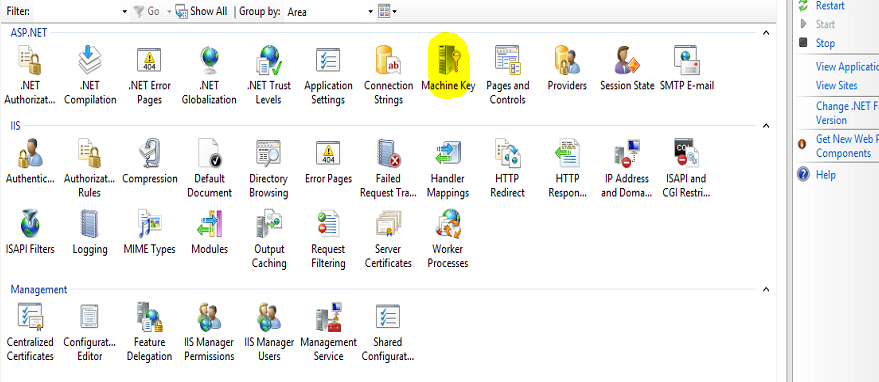
1. select "machine key " from IIS Home . Right Click "machine key" and select "Open feature"


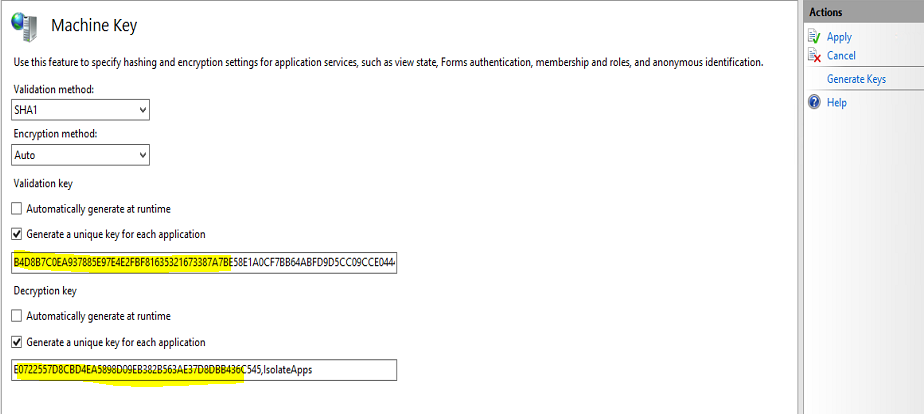
2. In machine key generate window, slect the validation metho and Encryption method as per requirement and click "generate Keys"


You will get the keys, as shown above.

Sunday, December 4, 2016

Microsoft SQL server - Find size of the Log files

Below script will help you to find the size of the log files in your db (data file,log file etc)
you can put the name of the database replacing "yourDb"
and if you need to get all the files details of the all the databases, just omit the filter where caluse


SELECT DB_NAME(database_id) AS DatabaseName,
Name AS Logical_Name,
Physical_Name, (size*8)/1024 SizeMB
FROM sys.master_files
WHERE DB_NAME(database_id) = 'yourDb'
GO


Friday, November 18, 2016

REST webservice - Apache CXF converts String to JSON incorrectly

I have created a simple REST webservice and it returns a String value from Response. But browser givesan error and nothing shows from tomcat side.


Error shown in font end: This is basically generic error

=======================

This page contains the following errors:

error on line 1 at column 1: Document is empty

Below is a rendering of the page up to the first error.

=============================


below is the coding for my webservice

------------------------------------------------------------------------------

@Path("/")
@WebService(name = "mailService", targetNamespace = "http://localhost/cxf-rest/example")
public interface MailService {

@GET
@Produces({ MediaType.APPLICATION_XML, MediaType.APPLICATION_JSON })
@Path("/testMail")
public Response sendTestMail(@QueryParam("env") String env);

}

--------------------------------------------------------------------

----------------------------------------------------------------------------------------

public class MailServiceImpl implements MailService {


@Override
public Response sendTestMail(String env) {
// TODO Auto-generated method stub
return Response.ok("good").build();
}
}


----------------------------------------------------------------------------------------

below is the definitions for 'beans.xml"

------------------------------------------------------------------------------------------

<jaxrs:server id="mailService" address="/mailservices">
<jaxrs:providers>
<bean class="org.codehaus.jackson.jaxrs.JacksonJsonProvider" />
</jaxrs:providers>
<jaxrs:serviceBeans>
<ref bean="mailServiceImpl" />
</jaxrs:serviceBeans>
<jaxrs:extensionMappings>
<entry key="xml" value="application/xml" />
<entry key="json" value="application/json" />
</jaxrs:extensionMappings>
</jaxrs:server>
<bean id="mailServiceImpl" class="com.rest.cxfrestservice.service.MailServiceImpl" />

-----------------------------------------------------------------------------------------------

Reason
Jaxb does not know how to convert String to Json.

you have few solutions

Solution 1:
change response type to "text/plain"


----------------------------------------------------------------------------------------

@Path("/")
@WebService(name = "mailService", targetNamespace = "http://localhost/cxf-rest/example")
public interface MailService {


@GET
@Produces("text/plain")
@Path("/testMail")
public Response sendTestMail(@QueryParam("env") String env);

}
----------------------------------------------------------------------------------------


this will solve the error. But output will be a plain text.

Solution 2 : 
Use wrapper

----------------------------------------------------------------------------------------

@XmlRootElement(name = "statusMessage")
public class StatusMessage {

private String message;

public String getMessage() {
return message;
}

public void setMessage(String message) {
this.message = message;
}

}

----------------------------------------------------------------------------------------

new Service Impl class

---------------------------------------------------------------------------------------

@Path("/")
@WebService(name = "mailService", targetNamespace = "http://localhost/cxf-rest/example")
public interface MailService {

@GET
@Produces({ MediaType.APPLICATION_XML, MediaType.APPLICATION_JSON })
@Path("/sendMail")
public Response sendRefreshMail(@QueryParam("env") String env);

}

------------------------------------------------------------------------------------------
----------------------------------------------------------------------------------------
public class MailServiceImpl implements MailService {

public Response sendRefreshMail(String env) {
if (env == null) {
return Response.status(Response.Status.BAD_REQUEST).build();
}
StatusMessage statusMessage = new StatusMessage();
statusMessage.setMessage(mailSao.sendEmail(env));

return Response.ok(statusMessage).build();
}


}


----------------------------------------------------------------------------------------


This will return response as needed. below is xml output

<statusMessage>
<message>SUCCESS</message>
</statusMessage>

below link is a good one

Thursday, November 17, 2016

Loading properties from default property file location in maven project

Sometimes loading the property from file becomes a headache to java developers and it starts giving some awful errors. Specially finding the correct path for the property file.
As per maven property files will be placed inside "resources" folder and these files are copied into 'classes' folder inside "WEB-INF" (WEB-INF\classes)

below is a java code block works fines taking the given property file from default location. (default =WEB-INF\classes)

Here property file is loaded using class loader and you need Java 7 to use this logic.
With this you can easily get rid of pain came from  Java 1.5

======================================================

String resourceName = "config.properties"; // could also be a constant
ClassLoader loader = Thread.currentThread().getContextClassLoader();
Properties props = new Properties();
try (InputStream resourceStream = loader
.getResourceAsStream(resourceName)) {
props.load(resourceStream);
System.out.println(props);
} catch (IOException e) {
// TODO Auto-generated catch block
e.printStackTrace();
}


=============================================================