Wednesday, September 15, 2021

Install MongoDB in ubuntu

 when you take a specific version of MongoDB, it does not support all the operating systems as a whole.

1. So we need to check the compatibility before.

2. Once find out the correct version suitable for your OS, you can start installing


Below are short steps to install mongo in Ubuntu 18.04 Bionic version.

1. Import the public key used by the package management system.

wget -qO - https://www.mongodb.org/static/pgp/server-5.0.asc | sudo apt-key add -


2. Create a list file for MongoDB

echo "deb [ arch=amd64,arm64 ] https://repo.mongodb.org/apt/ubuntu bionic/mongodb-org/5.0 multiverse" | sudo tee /etc/apt/sources.list.d/mongodb-org-5.0.list

3. Reload local package database

sudo apt-get update

4.Install the MongoDB packages

sudo apt-get install -y mongodb-org

5. Start MongoDB service

 before start service, check whether linux use "systemd" or "init" --> run below

ps --no-headers -o comm 1

to run mongodb

sudo systemctl start mongod

6. Add mondb service to start at restart

sudo systemctl enable mongod


For more info, you can follow

https://docs.mongodb.com/manual/tutorial/install-mongodb-on-ubuntu/

Monday, July 19, 2021

Hibernate - 1

1. Overview of ORM and Hibernate

2. Mappings

  1. Simple
  2. Component
  3. Inheritance 
  4. Collections
  5. Association  

3. Object states in hibernate

4. HQL

5. Criteria


JDBC - Challenges

1. Creating and Closing the connection

2. Dependency - drivers and connection related code depends on the database - whenever DB changes, code needs to be change. For any change, table rename, column added, data type.. for any small change needs application change.

3. Exception handling

4. SQL challenges - for programmer ( programmers tend to low in SQL )

5. Data conversion 


ORM - Object Relational Mapping - In simple Map Object(fields) with Table (columns)

XML based

Annotations 

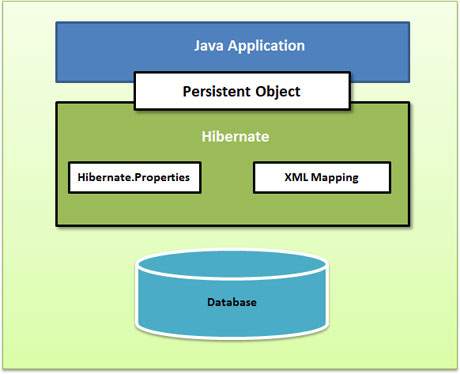
Hibernate - JPA specification - lies between Java Application and JDBC

Hibernate High Level View


Creating Application

Step 1 : Dependency 

    a. hibernate

     b. JDBC

Step 2: Entity or Persistent - java bean

Step 3: Mapping - contain bean and table ( no configuration on database )

     a.  XML 

      b. Annotations

Step 4: Database (hibernate config)

a. XML

b. properties

c. Programmatic

Step 5: Client - main application 


Step 1 : use spring initializer with adding Spring data JPA,  mysql (driver depends on DB)

Step 2: Create simple Java class and decorate with annotations. @Entity and @ID are important . If you do not use @Table, @Column automatically taken name of class as table name as fields as columns


Step 5: Where should the program start ? reading the configuration for DB. From configurations create Session factory (immutable singleton).Session factory is like a pool of connections.


In Code, lets' assume you have written code to read configuration and created SessionFactory. now execute code. Will tables get created. log will show dropping and creating tables.

No tables will be created. Why ? we have not made a session and create a object and set POJO to session and execute. Then hibernate will create a table, if not ( we are running on UPDATE, not CREATE)

Still new object will not be saved. Why ? 

By default - hibernate auto commit is disable.

Create a Transaction and commit after save(). you can see the INSERT statement. 


Friday, July 2, 2021

Docker Notes -1

 docker-compose down --rmi -all


how do we run two OS in one machine - Using Hypervisor


OS1  | OS2

----------

Hypervisor

-----------

Machine OS


Hypervisor : Virtual Box, VMVare, Hyper-v(only Windows)


Benifit creating Virtual machine

Run application in isolation

same application using different version

eg:

virtual Machine1{App1 with Node14, Mongo 4}

virtual Machine2{App2 with Node9, Mongo 3}


Problems with VMs

-----

Each machine needs full-blown OS (license)

Slow to start ( cause entire OS needs to start just as a normal machine)

Resource intensive ( takes certain Hardware - RAM, cpu ..)


Containers

-----

Allow running multiple apps in isolation(same kind of a isolation)

light weight

Use OS of the host ( share)

Start quickly ( OS already started)

need less hardware resources


so can run more containers compared to vms


docker run client - server architecture

client communicate using RESTApi

server --> docker engine


technically container is a process


basically all containers use kernal of the host
kernal - manages all applications and hardware


Sunday, June 6, 2021

Mongo DB - data file missing error

 Solution :

create data file --> C:\\data\\db\\


Below is the complete error log

--------------------------------


C:\SW\mongodb-win32-x86_64-windows-4.4.4\bin>mongod.exe

{"t":{"$date":"2021-06-07T08:32:24.699+05:30"},"s":"I",  "c":"CONTROL",  "id":23285,   "ctx":"main","msg":"Automatically disabling TLS 1.0, to force-enable TLS 1.0 specify --sslDisabledProtocols 'none'"}

{"t":{"$date":"2021-06-07T08:32:25.211+05:30"},"s":"W",  "c":"ASIO",     "id":22601,   "ctx":"main","msg":"No TransportLayer configured during NetworkInterface startup"}

{"t":{"$date":"2021-06-07T08:32:25.212+05:30"},"s":"I",  "c":"NETWORK",  "id":4648602, "ctx":"main","msg":"Implicit TCP FastOpen in use."}

{"t":{"$date":"2021-06-07T08:32:25.214+05:30"},"s":"I",  "c":"STORAGE",  "id":4615611, "ctx":"initandlisten","msg":"MongoDB starting","attr":{"pid":9236,"port":27017,"dbPath":"C:/data/db/","architecture":"64-bit","host":"COMPUTER"}}

{"t":{"$date":"2021-06-07T08:32:25.214+05:30"},"s":"I",  "c":"CONTROL",  "id":23398,   "ctx":"initandlisten","msg":"Target operating system minimum version","attr":{"targetMinOS":"Windows 7/Windows Server 2008 R2"}}

{"t":{"$date":"2021-06-07T08:32:25.214+05:30"},"s":"I",  "c":"CONTROL",  "id":23403,   "ctx":"initandlisten","msg":"Build Info","attr":{"buildInfo":{"version":"4.4.4","gitVersion":"8db30a63db1a9d84bdcad0c83369623f708e0397","modules":[],"allocator":"tcmalloc","environment":{"distmod":"windows","distarch":"x86_64","target_arch":"x86_64"}}}}

{"t":{"$date":"2021-06-07T08:32:25.215+05:30"},"s":"I",  "c":"CONTROL",  "id":51765,   "ctx":"initandlisten","msg":"Operating System","attr":{"os":{"name":"Microsoft Windows 10","version":"10.0 (build 19042)"}}}

{"t":{"$date":"2021-06-07T08:32:25.215+05:30"},"s":"I",  "c":"CONTROL",  "id":21951,   "ctx":"initandlisten","msg":"Options set by command line","attr":{"options":{}}}

{"t":{"$date":"2021-06-07T08:32:25.216+05:30"},"s":"E",  "c":"STORAGE",  "id":20557,   "ctx":"initandlisten","msg":"DBException in initAndListen, terminating","attr":{"error":"NonExistentPath: Data directory C:\\data\\db\\ not found. Create the missing directory or specify another path using (1) the --dbpath command line option, or (2) by adding the 'storage.dbPath' option in the configuration file."}}

{"t":{"$date":"2021-06-07T08:32:25.216+05:30"},"s":"I",  "c":"REPL",     "id":4784900, "ctx":"initandlisten","msg":"Stepping down the ReplicationCoordinator for shutdown","attr":{"waitTimeMillis":10000}}

{"t":{"$date":"2021-06-07T08:32:25.216+05:30"},"s":"I",  "c":"COMMAND",  "id":4784901, "ctx":"initandlisten","msg":"Shutting down the MirrorMaestro"}

{"t":{"$date":"2021-06-07T08:32:25.217+05:30"},"s":"I",  "c":"SHARDING", "id":4784902, "ctx":"initandlisten","msg":"Shutting down the WaitForMajorityService"}

{"t":{"$date":"2021-06-07T08:32:25.217+05:30"},"s":"I",  "c":"NETWORK",  "id":20562,   "ctx":"initandlisten","msg":"Shutdown: going to close listening sockets"}

{"t":{"$date":"2021-06-07T08:32:25.217+05:30"},"s":"I",  "c":"NETWORK",  "id":4784905, "ctx":"initandlisten","msg":"Shutting down the global connection pool"}

{"t":{"$date":"2021-06-07T08:32:25.217+05:30"},"s":"I",  "c":"STORAGE",  "id":4784906, "ctx":"initandlisten","msg":"Shutting down the FlowControlTicketholder"}

{"t":{"$date":"2021-06-07T08:32:25.218+05:30"},"s":"I",  "c":"-",        "id":20520,   "ctx":"initandlisten","msg":"Stopping further Flow Control ticket acquisitions."}

{"t":{"$date":"2021-06-07T08:32:25.219+05:30"},"s":"I",  "c":"NETWORK",  "id":4784918, "ctx":"initandlisten","msg":"Shutting down the ReplicaSetMonitor"}

{"t":{"$date":"2021-06-07T08:32:25.219+05:30"},"s":"I",  "c":"SHARDING", "id":4784921, "ctx":"initandlisten","msg":"Shutting down the MigrationUtilExecutor"}

{"t":{"$date":"2021-06-07T08:32:25.220+05:30"},"s":"I",  "c":"CONTROL",  "id":4784925, "ctx":"initandlisten","msg":"Shutting down free monitoring"}

{"t":{"$date":"2021-06-07T08:32:25.220+05:30"},"s":"I",  "c":"STORAGE",  "id":4784927, "ctx":"initandlisten","msg":"Shutting down the HealthLog"}

{"t":{"$date":"2021-06-07T08:32:25.221+05:30"},"s":"I",  "c":"STORAGE",  "id":4784929, "ctx":"initandlisten","msg":"Acquiring the global lock for shutdown"}

{"t":{"$date":"2021-06-07T08:32:25.227+05:30"},"s":"I",  "c":"-",        "id":4784931, "ctx":"initandlisten","msg":"Dropping the scope cache for shutdown"}

{"t":{"$date":"2021-06-07T08:32:25.227+05:30"},"s":"I",  "c":"FTDC",     "id":4784926, "ctx":"initandlisten","msg":"Shutting down full-time data capture"}

{"t":{"$date":"2021-06-07T08:32:25.229+05:30"},"s":"I",  "c":"CONTROL",  "id":20565,   "ctx":"initandlisten","msg":"Now exiting"}

{"t":{"$date":"2021-06-07T08:32:25.230+05:30"},"s":"I",  "c":"CONTROL",  "id":23138,   "ctx":"initandlisten","msg":"Shutting down","attr":{"exitCode":100}}


Wednesday, June 2, 2021

Cloud certification links


1. AWS Solutions Architect - Assoc (https://aws.amazon.com/certification/certified-solutions-architect-associate/)

 2. AWS Developer - Assoc (https://aws.amazon.com/certification/certified-developer-associate/

3. AWS SysOps Admin - Assoc (https://aws.amazon.com/certification/certified-sysops-admin-associate/

4. AWS Solutions Architect - Prof (https://aws.amazon.com/certification/certified-solutions-architect-professional/

5. AWS DevOps Engineer - Prof (https://aws.amazon.com/certification/certified-devops-engineer-professional/

6. AWS Big Data - Spec (https://aws.amazon.com/certification/certified-big-data-specialty/

7. GCP Assoc Cloud Engineer (https://cloud.google.com/certification/cloud-engineer

8. GCP Prof Cloud Architect (https://cloud.google.com/certification/cloud-architect

9. GCP Prof Data Engineer (https://cloud.google.com/certification/data-engineer

10. Azure Admin Assoc AZ-103 (https://www.microsoft.com/en-us/learning/azure-administrator.aspx

11. Azure Developer Assoc AZ-203 (https://www.microsoft.com/en-us/learning/azure-developer.aspx)

Negotiations

 When you first met

Preamble - Discussion happens before negotiation

1. Do not open at start


Create a bat file to set path

 you may have to set path manually so many times due to various reasons. In a scenario like that best thing is to make a bat file and set path at once. below is simple sample bat file for that.

1. create notepad and save with content to PATH variable as below and save as "path.bat", file name can be any name as per requirement.

SET PATH=C:\Program Files\Java\jdk-12.0.1\bin;C:\Project\New2019-07-22\sw\apache\apache-maven-3.5.4\bin;